Saturday, October 24, 2009

How to solve Unable to start Debug and xml parsing errror

Unable TO Start Debug Error

Whenever we run asp.net pages in our browser we may get an unable to start debug error

Just we need to udate the registry in the following way it will solve the error

XML Parsing Error: not well-formed

Whenever we access an asp.net page in our browser we may get an xml parsing error that says the XML is not well formed

Fix for ‘XML Parsing Error:
Click Start > Run, and type the following command depending on which ASP.NET framework is in use by the default web site in our IIS.
ASP.NET 3.5 Framework
%Windir%\Microsoft.NET\Framework\v2.0.50727\aspnet_regiis.exe -i

ASP.NET 2.0 Framework
%Windir%\Microsoft.NET\Framework\v2.0.50727\aspnet_regiis.exe -i

ASP.NET 1.1 Framework
%Windir%\Microsoft.NET\Framework\v1.1.4322\aspnet_regiis.exe -i

You should see a command window that is displayed briefly, that shows that ASP.NET is being installed. After the registration is successful, the window will be closed.

Now refresh the .aspx page that you got the XML Parser error for in the browser and your page should be rendered correctly.

Why did you get this error ?
I have seen this error happen to me in situations where I had installed IIS after the installing the .Net Framework. This make sense. If you install IIS after you install the .Net Framework, then the framework is not registered with IIS. So when a request for a .aspx page comes to IIS, it simply passes on the contents of the page as-is without processing it. So in effect, the browser receives the entire .aspx page’s code, tried to parse it as an XML file, encounters the parsing error at the second character in the page directive and stops.

Unable to start debugging on the web server.Check for one of the following things
If we install VS2010 after VS2008 and we want to run code from VS2008 then we get error.The error is generate because of as ASP.net Version debugging option is changed.We can solve this issues by doing the following things
1>For IIS 5.6
We need to navigate the IIS virtual directory properties path=>then ASP.Net tab=>after that we need to change the ASP.NET version.
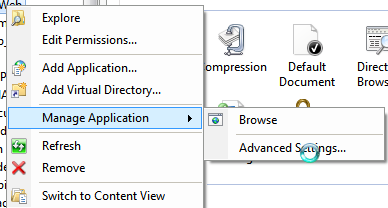
1>For IIS 7.5
Nvigate to the Manage Application/Advanced Settings=>Then change the Application Pool
Friday, August 28, 2009

Create EXE or Setup File in .NET Windows Application

1>First create a project and make the application
2>Do unit testing so as to the application run correct.
After you have developed your windows apllication,now you want to make a exe.how can?
These steps are gives the guidance to you…
3>Go to file menu > click Add > new project >now "Add New Project" Dialog appear

4.Select "Other Project Types" and click "Setup and Deployment' projects,Choose "Setup Project" give name project name in name text box finally click OK.

5.New project appear in solution explorer,for example you give the name "TestAddition"..it will display with this name.
6.Right click the TestAddition > go View > click "File System"

7.You can see the "File System on TargetMachine" under three folders Application Folder, User’s Desktop, User’s Program Menu.

8.Select Application Folder and right click Add>Project Output>select Primary output

9.Select User’s Desktop richt click on the second window>click create new shortcut>select output file from Application folder>change the file name from primary output name to MyEXE.Click on next >> same procedure follows the user’s program menu also
9.If you want to change the Manufactures name for exe,just right click the project go to properties change the properties as per you requirement

10>Finally Build the new project After successfully Build the project myEXE(Setup) will be appear in Application Debug or Release folder(depend upon the properties settings)

EXE available @ this location
To find your exe location go the project folder.there have one more folder created with the name of your exe.
Enter the folder there you find Debug folder.Now you found your exe or set up file.

When you want to install the EXE on the client machine,you should be installed .NET Framework on that mc because,Applications and controls written for the .NET Framework version 2.0 require the .NET Framework Redistributable Package version 2.0 to be installed on the computer where the application or control runs.

How To add windows service into the service list
1>First create a windows service application.
2>project/bin/debug folder exe will be created .
3>Open the visual studio command prompt
4>Navigate to the service exe path

5>Type Installutil SERVICENAME.exe
6>Enter

How To de register windows service from the service list
1>Go to command prompt and type
2>sc delete SERVICENAME

Sunday, August 16, 2009

How do I import Access Database into SQL Database(2000)

1.Right click on any database
2.Select ALL TASKS and then select IMPORT DATA after clicking
3.One dialog box will appear,click NEXT
4. And choose MICROSOFT ACCESS as DATA SOURCE, what displayed on the following picture.

Then BROWSE ur access file then click NEXT(keep username and password blank)
5.Chosse the DESTINATION[SQL native client].Click on properties

6.Chosse Data Source(localhost),select a specific username and password.
(With sa sa),Chosse Database from Initial Catalog.Click Ok.
7.Click Next.

8.Select copy tables and views from source database then click next
9.Select all tables,click Next.
10.Check run immediately,click Next.
11.Click finish.

Sunday, July 12, 2009

Write XML in c#

How to create xml

To create xml we need to do following steps=>

1)First include the name i)System.Xml ii)System.IO iii)System.Text.

2)create writer object

>XmlTextWriter writer = new XmlTextWriter(Server.MapPath("xml/userInfo.xml"), Encoding.UTF8);
In Server.MapPath we specify the path where we would like to create xml file.
statr to write by writer.WriteStartDocument();
writer.WriteStartElement("userInfo"); this specify strat element with element userInfo
writer.WriteElementString("urlReferrer", "none");this specify sub element with element urlReferrer and value none
writer.WriteAttributeString("timeVisited", DateTime.Now.ToString());this specify a element attribute with timeVisited
writer.WriteEndElement(); this specify end of a element
writer.WriteEndDocument(); this specify end of a document.
writer.Close(); this specify close of a document.

Saturday, December 6, 2008

Using Triggers In SQL Server /Implementing Trigger In SQL Server

Using Triggers In SQL Server /Implementing Trigger In SQL Server


A trigger is used to execute a bach of sql code when a specific event is fired. There are two types of trigger


1>AFTER TRIGGER.


2>INSTEAD TRIGGER.


AFTER TRIGGER is used after a specific event fired.An AFTER trigger is a trigger that gets executed automatically before the transaction is committed or rolled back.


A trigger which gets executed automatically in place of triggering actions i.e., INSERT, DELETE and UPDATE is called an INSTEAD OF trigger.INSTEAD OFtriggers gets executed automatically before the Primary Key and the Foreign Key constraints are checked, whereas the traditional AFTER triggers gets executed automatically after these constraints are checked.


How to execute TRIGGER


First Open the Enterprice manager


1)Start -> Programs -> Microsoft SQL Server -> Enterprise Manager.


2)Expand Sql Server Group->Expand Database->Click on Tables .


3)Right click on the table and choose All Tasks -> Manage Triggers.This will open the trigger properties window, which allows us to create a new trigger:


The syntaxt of the Create Trigger is shown bellow.


1)An example of fire TRIGGER After an INSERT


CREATE TRIGGER [rndTrigger_insert] ON [dbo].[rnd_store_procedure]


FOR INSERT

AS


DECLARE @FName VARCHAR(255)

DECLARE @LName VARCHAR(255)

DECLARE @Address VARCHAR(255)

DECLARE @StoredID BIGINT


SELECT @StoredID = (SELECT PKID FROM Inserted)

SELECT @FName = (SELECT FName FROM Inserted)

SELECT @LName = (SELECT LName FROM Inserted)

SELECT @Address = (SELECT Address FROM Inserted)


INSERT INTO rnd_trigger (StoredID,FName,LName,Address) VALUES (@StoredID,@FName,@LName,@Address)


In the above example it is shown rndTrigger object is created and it is fired when data inserted into table rnd_store_procedure.


When the TRIGGER is fired data also inserted into table rnd_trigger.


2) An example of fire TRIGGER After an DELETE.


CREATE TRIGGER [rndTrigger_delete] ON [dbo].[rnd_store_procedure]


FOR DELETE

AS


DECLARE @PKID BIGINT

DECLARE @Status BIT


SELECT @PKID = (SELECT PKID FROM Deleted)

SELECT @Status = (SELECT Status FROM Deleted)


if(@Status = 1)

BEGIN

RETURN

END


DELETE FROM rnd_trigger WHERE StoredID = @PKID


In the above example it is shown rndTrigger object is created and it is fired when data deleted from table rnd_store_procedure.


When the TRIGGER is fired it is checked the deleted record status is true or false.


If deleted record status is false then corresponding record also deleted from rnd_trigger.


3) An example of fire TRIGGER After an UPDATE.


CREATE TRIGGER [rndTrigger_update] ON [dbo].[rnd_store_procedure]

FOR UPDATE

AS


DECLARE @PKID BIGINT

DECLARE @FName VARCHAR(255)

DECLARE @LName VARCHAR(255)

DECLARE @Address VARCHAR(255)


IF NOT UPDATE(FName) AND NOT UPDATE(LName)

BEGIN

RETURN

END


SELECT @PKID = (SELECT PKID FROM Inserted)

SELECT @FName = (SELECT FName FROM Inserted)

SELECT @LName = (SELECT LName FROM Inserted)

SELECT @Address = (SELECT Address FROM Inserted)


UPDATE rnd_trigger set FName = @FName,LName = @LName,Address = @Address

WHERE StoredID = @PKID


In the above example it is shown rndTrigger object is created and it is fired when rnd_store_procedure is updated.


When the TRIGGER is fired it is checked the FName AND LName from record weather being modified or not.If record is being modified then record from table rnd_trigger also modified.


Sunday, October 19, 2008

Few Conceptual topic in Asp.Net usingc#

Importent Note:

We have to remember that static member and static method belongs to class rather than to the object of the class i.e we can access a static member or static method by class name.member name or class name.method name.
we cant access a static member or static method by creating a object of   that class.

Get and Set property in c#


When we using get and set property in c# we use First1 but not the Second1.

While we using Property function we have to remember the following pont
1)Property without a 'ReadOnly' or 'WriteOnly' specifier must provide both a 'Get' and a 'Set'.
2)Property Statement cannot appear within a method body.

Public Property Name() As String
Get
Return mName
End Get
Set(ByVal value As String)
mName = value
End Set
End Property

Its strongly recomended that we never use () after a poperty name.Because if we use () after property name then it will treat as a function not a property.Thats why we always use First1 not Second1

(Note:Get is use to read a Property and Set is use to write Property)


First1

public string getName


{


   get


   {


      return Name;


    } 


   set


   {


    Name = value;


    }


}


Second1

public string getName()


{


   get


    {


      return Name;


    } 


   set


   {


    Name = value;


    }


}


An example, which uses a set of methods, to access a private data field is shown below.


using System;

class MyClass

{

    private int x;

    public void SetX(int i)

    {

        x = i;

    }

    public int GetX()

    {

        return x;

    }

}

class MyClient

{

    public static void Main()

    {

        MyClass mc = new MyClass();

        mc.SetX(10);

        int xVal = mc.GetX();

        Response.Write(xVal);//Displays 10

    }

}


But C# provides a built in mechanism called properties to access private data member


The general form of declaring a property is as follows.          


<acces_modifier> <return_type> <property_name>

{

    get

    {

    }

    set

    {

    }

}


Above program can be modifies with a property X as follows.


using System;

class MyClass

{

    private int x;

    public int X

    {

        get

        {

            return x;

        }

        set

        {

            x = value;

        }

    }

}

class MyClient

{

    public static void Main()

    {

        MyClass mc = new MyClass();

        mc.X = 10;

        int xVal = mc.X;

        Response.Write(xVal);//Displays 10

    }


We have to rember that a property should have at least one accessor either set or get .The set accessor has a free variable available in it called value, which gets created automatically by the compiler. We can't declare any variable with the name value inside the set accessor.


Static Properties


The following program shows a class with a static property. 


using System;

class MyClass

{

    private static int x;

    public static int X

    {

        get

        {

            return x;

        }

        set

        {

            x = value;

        }

    }

}

class MyClient

{

    public static void Main()

    {

        MyClass.X = 10;

        int xVal = MyClass.X;

        Response.Write(xVal);//Displays 10

    }

}  


Note:Static property can access only other static members of the class. Also static properties are invoking by using the class name


Properties & Inheritance


The properties of a Base class can be inherited to a Derived class. 


using System;

class Base

{

    public int x ;

    public int X

    {

        get

        {


            return x+1;

        }

        set

        {

            x =value;

        }

    }

}

class Derived : Base

{

}

class MyClient

{

    public static void Main()

    {

        Derived d1 = new Derived();

        d1.X = 10;

        Response.Write(d1.X);//Displays 'Base SET Base GET 11'

    }

}


The above program is very straightforward. The inheritance of properties is just like inheritance any other member. 


Properties & Polymorphism


A Base class property can be polymorphicaly overridden in a Derived class. But remember that the modifiers like virtual, override etc are using at property level, not at accessor level. 


using System;

class Base

{

    public virtual int X

    {

        get

        {

            Console.Write("Base GET");

            return 10;

        }

        set

        {

            Console.Write("Base SET");

        }

    }

}

class Derived : Base

{

    public override int X

    {

        get

        {

            Console.Write("Derived GET");

            return 10;

        }

        set

        {

            Console.Write("Derived SET");

        }

    }

}

class MyClient

{

    public static void Main()

    {

        Base b1 = new Derived();

        b1.X = 10;

        Response.Write(b1.X);//Displays 'Derived SET Derived GET 10'

    }

}

Abstract Properties


A property inside a class can be declared as abstract by using the keyword abstract. Remember that an abstract property in a class carries no code at all. The get/set accessors are simply represented with a semicolon. In the derived class we must implement both set and get assessors. 


If the abstract class contains only set accessor, we can implement only set in the derived class. 


The following program shows an abstract property in action. 


using System;

abstract class Abstract

{

    public abstract int X

    {

        get;

        set;

    }

}

class Concrete : Abstract

    {

    public override int X

    {

        get

        {

            Response.Write(" GET");

            return 10;

        }

        set

        {

            Response.Write(" SET");

        }

    }

}

class MyClient

{

    public static void Main()

    {

        Concrete c1 = new Concrete();

        c1.X = 10;

        Response.Write(c1.X);//Displays 'SET GET 10'

    }


The properties are an important features added in language level inside C#. They are very useful in GUI programming. Remember that the compiler actually generates the appropriate getter and setter methods when it parses the C# property syntax.