Saturday, June 26, 2010

How to create custome control

How to create custome control
custom control are compile code that execute on server.Custom control can be simply build by override the Render() method.To create a custom control we just need to do the following steps

1>open visual studio.

2>create a Web COntrol Library Project

3>Overrid the Render Method.

4>Build the project and generate the Dll.
5>Create a Web project.

6>Add dll.

7>Add custom control.

8>Build and run the code.

How To solve Configuration Error


If the above error occur the simplest solution is doing the following changes..

The actual reason is that the latest version of Ajax Control Toolkit expect to have a .net 3.5SP1 runtime environment.So we need to install Dotnet Framework 3.5SP1 and the issue will be solved.We can find the require service pack here
How To solve Configuration Error
If the configuration error occur that could not load assemby system.web.extension that meas we want to browse a site which has been made with Ajax control toolkit but the toolkit version is not being installed.In the above senario we need to install the ajax control toolkit the the problem will solve.

Sunday, June 6, 2010

How to java standard tag library work

To Use JSTL we need to do the following things


1>Download the standard.jar and jstl.jar and keep them into web-INF/lib folder.
Download Link
2>Download the requeried tld.
3> For your JSTL Web application, edit your web.xml file and add the following entries:


How to work MySql Cursor,Store Procedure,Function

MySql Cursor calling from java


Mysql Cursor Example

Mysql Cursor Example

Mysql Function Example

Saturday, May 22, 2010

How to open popup with Post field

Do the following Things
1>First keep the code in the parent page
2>Keep the following javascript In the above code multi popup is open so dynamicaly change the target name.
Note:When we want to open multi popup at that moment we just dynamically change the sub window name.

How to open popup with Post field

Do the following Things

1>First keep the code in the parent page

2>Keep the following javascript
In the above code multi popup is open so dynamically change the target name.
Note:When we want to open multi popup at that moment we just dynamically change the sub window name.

Saturday, October 24, 2009

How to solve Unable to start Debug and xml parsing errror

Unable TO Start Debug Error

Whenever we run asp.net pages in our browser we may get an unable to start debug error

Just we need to udate the registry in the following way it will solve the error

XML Parsing Error: not well-formed

Whenever we access an asp.net page in our browser we may get an xml parsing error that says the XML is not well formed

Fix for ‘XML Parsing Error:
Click Start > Run, and type the following command depending on which ASP.NET framework is in use by the default web site in our IIS.
ASP.NET 3.5 Framework
%Windir%\Microsoft.NET\Framework\v2.0.50727\aspnet_regiis.exe -i

ASP.NET 2.0 Framework
%Windir%\Microsoft.NET\Framework\v2.0.50727\aspnet_regiis.exe -i

ASP.NET 1.1 Framework
%Windir%\Microsoft.NET\Framework\v1.1.4322\aspnet_regiis.exe -i

You should see a command window that is displayed briefly, that shows that ASP.NET is being installed. After the registration is successful, the window will be closed.

Now refresh the .aspx page that you got the XML Parser error for in the browser and your page should be rendered correctly.

Why did you get this error ?
I have seen this error happen to me in situations where I had installed IIS after the installing the .Net Framework. This make sense. If you install IIS after you install the .Net Framework, then the framework is not registered with IIS. So when a request for a .aspx page comes to IIS, it simply passes on the contents of the page as-is without processing it. So in effect, the browser receives the entire .aspx page’s code, tried to parse it as an XML file, encounters the parsing error at the second character in the page directive and stops.

Unable to start debugging on the web server.Check for one of the following things
If we install VS2010 after VS2008 and we want to run code from VS2008 then we get error.The error is generate because of as ASP.net Version debugging option is changed.We can solve this issues by doing the following things
1>For IIS 5.6
We need to navigate the IIS virtual directory properties path=>then ASP.Net tab=>after that we need to change the ASP.NET version.
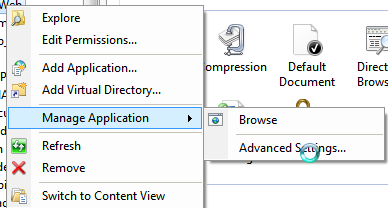
1>For IIS 7.5
Nvigate to the Manage Application/Advanced Settings=>Then change the Application Pool