Sunday, August 16, 2009

How do I import Access Database into SQL Database(2000)

1.Right click on any database
2.Select ALL TASKS and then select IMPORT DATA after clicking
3.One dialog box will appear,click NEXT
4. And choose MICROSOFT ACCESS as DATA SOURCE, what displayed on the following picture.

Then BROWSE ur access file then click NEXT(keep username and password blank)
5.Chosse the DESTINATION[SQL native client].Click on properties

6.Chosse Data Source(localhost),select a specific username and password.
(With sa sa),Chosse Database from Initial Catalog.Click Ok.
7.Click Next.

8.Select copy tables and views from source database then click next
9.Select all tables,click Next.
10.Check run immediately,click Next.
11.Click finish.

Sunday, July 12, 2009

Write XML in c#

How to create xml

To create xml we need to do following steps=>

1)First include the name i)System.Xml ii)System.IO iii)System.Text.

2)create writer object

>XmlTextWriter writer = new XmlTextWriter(Server.MapPath("xml/userInfo.xml"), Encoding.UTF8);
In Server.MapPath we specify the path where we would like to create xml file.
statr to write by writer.WriteStartDocument();
writer.WriteStartElement("userInfo"); this specify strat element with element userInfo
writer.WriteElementString("urlReferrer", "none");this specify sub element with element urlReferrer and value none
writer.WriteAttributeString("timeVisited", DateTime.Now.ToString());this specify a element attribute with timeVisited
writer.WriteEndElement(); this specify end of a element
writer.WriteEndDocument(); this specify end of a document.
writer.Close(); this specify close of a document.

Saturday, December 6, 2008

Using Triggers In SQL Server /Implementing Trigger In SQL Server

Using Triggers In SQL Server /Implementing Trigger In SQL Server


A trigger is used to execute a bach of sql code when a specific event is fired. There are two types of trigger


1>AFTER TRIGGER.


2>INSTEAD TRIGGER.


AFTER TRIGGER is used after a specific event fired.An AFTER trigger is a trigger that gets executed automatically before the transaction is committed or rolled back.


A trigger which gets executed automatically in place of triggering actions i.e., INSERT, DELETE and UPDATE is called an INSTEAD OF trigger.INSTEAD OFtriggers gets executed automatically before the Primary Key and the Foreign Key constraints are checked, whereas the traditional AFTER triggers gets executed automatically after these constraints are checked.


How to execute TRIGGER


First Open the Enterprice manager


1)Start -> Programs -> Microsoft SQL Server -> Enterprise Manager.


2)Expand Sql Server Group->Expand Database->Click on Tables .
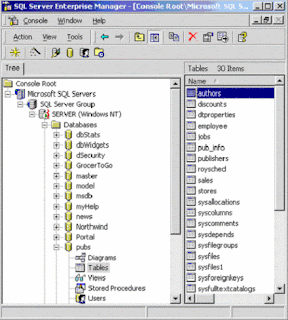


3)Right click on the table and choose All Tasks -> Manage Triggers.This will open the trigger properties window, which allows us to create a new trigger:
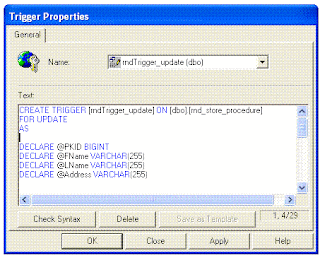


The syntaxt of the Create Trigger is shown bellow.


1)An example of fire TRIGGER After an INSERT


CREATE TRIGGER [rndTrigger_insert] ON [dbo].[rnd_store_procedure]


FOR INSERT

AS


DECLARE @FName VARCHAR(255)

DECLARE @LName VARCHAR(255)

DECLARE @Address VARCHAR(255)

DECLARE @StoredID BIGINT


SELECT @StoredID = (SELECT PKID FROM Inserted)

SELECT @FName = (SELECT FName FROM Inserted)

SELECT @LName = (SELECT LName FROM Inserted)

SELECT @Address = (SELECT Address FROM Inserted)


INSERT INTO rnd_trigger (StoredID,FName,LName,Address) VALUES (@StoredID,@FName,@LName,@Address)


In the above example it is shown rndTrigger object is created and it is fired when data inserted into table rnd_store_procedure.


When the TRIGGER is fired data also inserted into table rnd_trigger.


2) An example of fire TRIGGER After an DELETE.


CREATE TRIGGER [rndTrigger_delete] ON [dbo].[rnd_store_procedure]


FOR DELETE

AS


DECLARE @PKID BIGINT

DECLARE @Status BIT


SELECT @PKID = (SELECT PKID FROM Deleted)

SELECT @Status = (SELECT Status FROM Deleted)


if(@Status = 1)

BEGIN

RETURN

END


DELETE FROM rnd_trigger WHERE StoredID = @PKID


In the above example it is shown rndTrigger object is created and it is fired when data deleted from table rnd_store_procedure.


When the TRIGGER is fired it is checked the deleted record status is true or false.


If deleted record status is false then corresponding record also deleted from rnd_trigger.


3) An example of fire TRIGGER After an UPDATE.


CREATE TRIGGER [rndTrigger_update] ON [dbo].[rnd_store_procedure]

FOR UPDATE

AS


DECLARE @PKID BIGINT

DECLARE @FName VARCHAR(255)

DECLARE @LName VARCHAR(255)

DECLARE @Address VARCHAR(255)


IF NOT UPDATE(FName) AND NOT UPDATE(LName)

BEGIN

RETURN

END


SELECT @PKID = (SELECT PKID FROM Inserted)

SELECT @FName = (SELECT FName FROM Inserted)

SELECT @LName = (SELECT LName FROM Inserted)

SELECT @Address = (SELECT Address FROM Inserted)


UPDATE rnd_trigger set FName = @FName,LName = @LName,Address = @Address

WHERE StoredID = @PKID


In the above example it is shown rndTrigger object is created and it is fired when rnd_store_procedure is updated.


When the TRIGGER is fired it is checked the FName AND LName from record weather being modified or not.If record is being modified then record from table rnd_trigger also modified.


Sunday, October 19, 2008

Few Conceptual topic in Asp.Net usingc#

Importent Note:

We have to remember that static member and static method belongs to class rather than to the object of the class i.e we can access a static member or static method by class name.member name or class name.method name.
we cant access a static member or static method by creating a object of   that class.

Get and Set property in c#


When we using get and set property in c# we use First1 but not the Second1.

While we using Property function we have to remember the following pont
1)Property without a 'ReadOnly' or 'WriteOnly' specifier must provide both a 'Get' and a 'Set'.
2)Property Statement cannot appear within a method body.

Public Property Name() As String
Get
Return mName
End Get
Set(ByVal value As String)
mName = value
End Set
End Property

Its strongly recomended that we never use () after a poperty name.Because if we use () after property name then it will treat as a function not a property.Thats why we always use First1 not Second1

(Note:Get is use to read a Property and Set is use to write Property)


First1

public string getName


{


   get


   {


      return Name;


    } 


   set


   {


    Name = value;


    }


}


Second1

public string getName()


{


   get


    {


      return Name;


    } 


   set


   {


    Name = value;


    }


}


An example, which uses a set of methods, to access a private data field is shown below.


using System;

class MyClass

{

    private int x;

    public void SetX(int i)

    {

        x = i;

    }

    public int GetX()

    {

        return x;

    }

}

class MyClient

{

    public static void Main()

    {

        MyClass mc = new MyClass();

        mc.SetX(10);

        int xVal = mc.GetX();

        Response.Write(xVal);//Displays 10

    }

}


But C# provides a built in mechanism called properties to access private data member


The general form of declaring a property is as follows.          


<acces_modifier> <return_type> <property_name>

{

    get

    {

    }

    set

    {

    }

}


Above program can be modifies with a property X as follows.


using System;

class MyClass

{

    private int x;

    public int X

    {

        get

        {

            return x;

        }

        set

        {

            x = value;

        }

    }

}

class MyClient

{

    public static void Main()

    {

        MyClass mc = new MyClass();

        mc.X = 10;

        int xVal = mc.X;

        Response.Write(xVal);//Displays 10

    }


We have to rember that a property should have at least one accessor either set or get .The set accessor has a free variable available in it called value, which gets created automatically by the compiler. We can't declare any variable with the name value inside the set accessor.


Static Properties


The following program shows a class with a static property. 


using System;

class MyClass

{

    private static int x;

    public static int X

    {

        get

        {

            return x;

        }

        set

        {

            x = value;

        }

    }

}

class MyClient

{

    public static void Main()

    {

        MyClass.X = 10;

        int xVal = MyClass.X;

        Response.Write(xVal);//Displays 10

    }

}  


Note:Static property can access only other static members of the class. Also static properties are invoking by using the class name


Properties & Inheritance


The properties of a Base class can be inherited to a Derived class. 


using System;

class Base

{

    public int x ;

    public int X

    {

        get

        {


            return x+1;

        }

        set

        {

            x =value;

        }

    }

}

class Derived : Base

{

}

class MyClient

{

    public static void Main()

    {

        Derived d1 = new Derived();

        d1.X = 10;

        Response.Write(d1.X);//Displays 'Base SET Base GET 11'

    }

}


The above program is very straightforward. The inheritance of properties is just like inheritance any other member. 


Properties & Polymorphism


A Base class property can be polymorphicaly overridden in a Derived class. But remember that the modifiers like virtual, override etc are using at property level, not at accessor level. 


using System;

class Base

{

    public virtual int X

    {

        get

        {

            Console.Write("Base GET");

            return 10;

        }

        set

        {

            Console.Write("Base SET");

        }

    }

}

class Derived : Base

{

    public override int X

    {

        get

        {

            Console.Write("Derived GET");

            return 10;

        }

        set

        {

            Console.Write("Derived SET");

        }

    }

}

class MyClient

{

    public static void Main()

    {

        Base b1 = new Derived();

        b1.X = 10;

        Response.Write(b1.X);//Displays 'Derived SET Derived GET 10'

    }

}

Abstract Properties


A property inside a class can be declared as abstract by using the keyword abstract. Remember that an abstract property in a class carries no code at all. The get/set accessors are simply represented with a semicolon. In the derived class we must implement both set and get assessors. 


If the abstract class contains only set accessor, we can implement only set in the derived class. 


The following program shows an abstract property in action. 


using System;

abstract class Abstract

{

    public abstract int X

    {

        get;

        set;

    }

}

class Concrete : Abstract

    {

    public override int X

    {

        get

        {

            Response.Write(" GET");

            return 10;

        }

        set

        {

            Response.Write(" SET");

        }

    }

}

class MyClient

{

    public static void Main()

    {

        Concrete c1 = new Concrete();

        c1.X = 10;

        Response.Write(c1.X);//Displays 'SET GET 10'

    }


The properties are an important features added in language level inside C#. They are very useful in GUI programming. Remember that the compiler actually generates the appropriate getter and setter methods when it parses the C# property syntax.


Friday, October 10, 2008

Showing line numbers in Visual Studio.NET

There have so many people like to see line number along with code in the left so as to they can easily found error and it is easer to remember where my code is but also to use the ctrl + g (goto line number) shortcut. By default this feature is disabled but luckely it's quite easy to turn it on.

Just navigate to the menu, choose Tools | Options and expand the Text editor node in the treeview on the left like shown in Figure 1:


Figure 1: The expanded Text Editor part.

In Figure 1 it is showing All languages node or the node of the language that you're interested in and check the Line numbers checkbox. Click the OK button and you have the line numbers appearing in your source view.


Tuesday, August 19, 2008

Control sql server through command prompt

Following are listing of Sql command to handle sql server from command prompt
(In case of sql server 2000 use osql,and sqlcmd for 2005)

usage: Sqlcmd            [-U login id]          [-P password]
  [-S server]            [-H hostname]          [-E trusted connection]
  [-d use database name] [-l login timeout]     [-t query timeout]
  [-h headers]           [-s colseparator]      [-w screen width]
  [-a packetsize]        [-e echo input]        [-I Enable Quoted Identifiers]
  [-c cmdend]            [-L[c] list servers[clean output]]
  [-q "cmdline query"]   [-Q "cmdline query" and exit]
  [-m errorlevel]        [-V severitylevel]     [-W remove trailing spaces]
  [-u unicode output]    [-r[0|1] msgs to stderr]
  [-i inputfile]         [-o outputfile]        [-z new password]
  [-f <codepage> | i:<codepage>[,o:<codepage>]] [-Z new password and exit]
  [-k[1|2] remove[replace] control characters]
  [-y variable length type display width]
  [-Y fixed length type display width]
  [-p[1] print statistics[colon format]]
  [-R use client regional setting]
  [-b On error batch abort]
  [-v var = "value"...]  [-A dedicated admin connection]
  [-X[1] disable commands, startup script, environment variables [and exit]]
  [-x disable variable substitution]
  [-? show syntax summary]

The example below shows how to handle sql server
First of all to open the command promt go through the following process
Click on start->then Run->type cmd->Press enter->now you can see a command promt window.

1->Example to show server name and version of sql server in 2005)
Type the Following command to command prompt nothing else.
SQLCMD -S P13 -E
1> select @@servername
2> Select @@version
3> go
Note:->Here P13 indicate server name and E for windows authentication.
(N.B->Just use OSQL instead of SQLCMD in case of 2000 server)

Alternative way.
SQLCMD -U sa -P sa -Q"Select @@servername"
(N.B->Just use OSQL instead of SQLCMD in case of 2000 server)
Note:->Here sa= your sql server username and sa your sql server password.

2->Example to changes the default database to 'master':
SQLCMD -d master -U sa -P sa -Q"EXEC sp_defaultdb 'MyLogin','master'"
(N.B->Just use OSQL instead of SQLCMD in case of 2000 server)
Note:->Here sa= your sql server username and sa your sql server password
(N.B->To come out from a command you can type quit)

2->Example to changes the any database to 'any database':
SQLCMD -d osaosa -U sa -P sa -Q"EXEC sp_renamedb 'olddb', 'newdb'"
(N.B->Just use OSQL instead of SQLCMD in case of 2000 server)
Note:->Here sa= your sql server username and sa your sql server password