Watermarking PDF documents using HttpHandlers
Whenever we work with Httphandler we have to inherit IHttpHandler.
We will be unable to inherit IHttpHandler unless & until we add System.web as references.
1>Create a class library with the name Handler
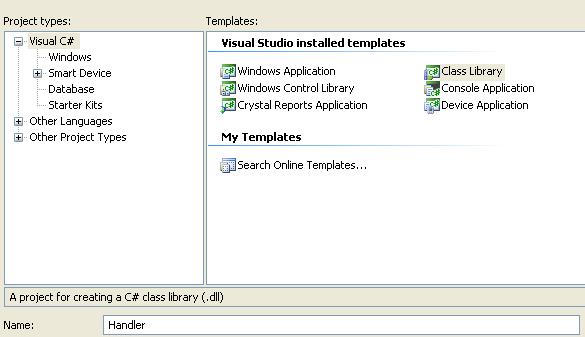
2>Rename the class1.cs with required Class and here it is PdfHandler.

3>Add IHttpHandler interface.If any problem occured just ad the reference System.web from .Net tab listing.

4>Add ProcessRequest and IsReusable Method.

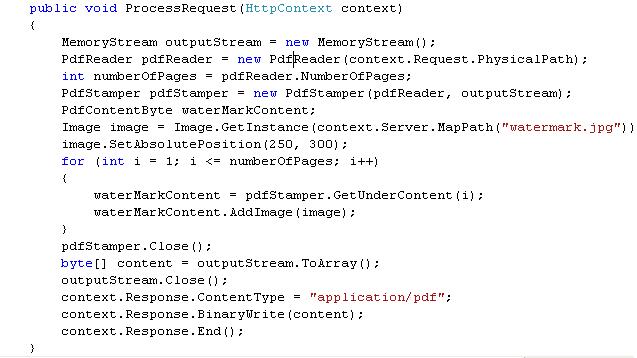
5>Download the iTextSharp.dll and add it to references so as to pdf related function can work.
6>Build the class library.After successfully build dll will be generated.
7>Create a new website TestPdfRender and add the binary output of the custom handler as a reference.

8>Add the handler to the web.config.

9>To map the .pdf extension through IIS: within IIS, right click on TestPdfRender->properties->under Directory tab, click on configuration->add a new extension with extension .pdf and set Executable to the .NET runtime ("c:\windows\microsoft.net\framework\v2.0.50727\aspnet_isapi.dll")
keep the rest of the sections to their default values.
Click on OK to close all the open configuration windows.
Note:here IIS 6 have one error after selecting the dll at once ok button is not being enable.Just click on the executable text box then ok button is enable.

10>Now the application is ready for testing.open the default.aspx and add this test hyperlink control:

11>Genereated output is.


No comments:
Post a Comment